
Assign Tasks Automatically: Stage Automations and Nurture Campaign Steps
Assign Tasks Automatically: Stage Automations and Nurture Campaign Steps
A task in 100Hires is a to-do assigned to a teammate about a candidate - "review resume", "send LinkedIn request", "call candidate". You can create tasks manually, but the bigger lever is to have the system assign them automatically when a candidate hits a pipeline stage or a step in a nurture campaign.
There are two ways automation creates a task:
- As a stage automation - triggered when a candidate moves to a specific pipeline stage.
- As a step inside a Nurture Campaign - triggered as part of a multi-step sequence (alongside emails, SMS, and voicemails).
Stage automation: Assign Task
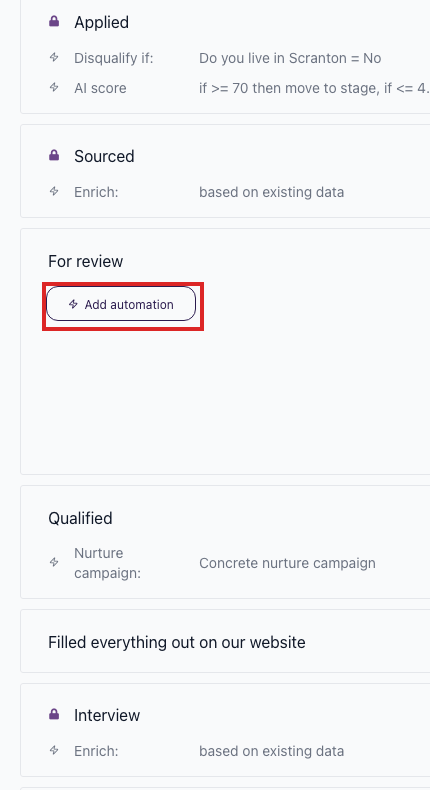
On a job's Workflow tab, you can add automations to a pipeline stage. One of the automation types is Assign Task. When a candidate moves to that stage, the system creates a task automatically.
The Assign Task automation lets you set:

- Task type - the kind of task (review candidate, send LinkedIn request, call candidate, and similar).
- Assignee - who the task is for.
- Due date - when the task is due.
- Priority - P1 through P5.
Use cases: have a teammate review every candidate that enters a Screening stage, send a LinkedIn outreach when a sourced candidate hits a Sourcing stage, or call every candidate that reaches Final Round.
Nurture campaign step: assign task
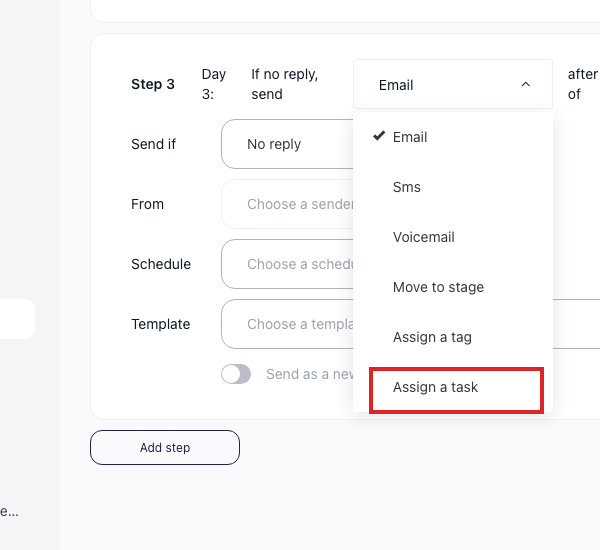
A Nurture Campaign is a multi-step automated sequence. Open Settings > Nurture campaigns, edit a campaign, and on any step the type dropdown lists every step kind you can use:
- Sms
- Voicemail
- Move to stage
- Assign a tag
- Assign a task
Adding an "Assign a task" step inside a Nurture Campaign lets you mix automated outreach with a manual touchpoint.
 For example, an outreach sequence can send two emails, wait, then automatically create a task asking a recruiter to send a LinkedIn connection request - the email portion runs on its own, but the manual step is queued and tracked.
Why this matters
The standard mental model for automations is "send email" and "move stage". Adding "assign task" lets you build sequences that mix automated outreach with steps a human has to do - without losing track of which candidates are due for a manual touchpoint.
Updated on: 18/06/2026
Thank you!