
Bulk Actions: Operate on Many Candidates at Once
Bulk Actions: Operate on Many Candidates at Once
Bulk actions let you do the same operation on many candidates at once - send an email to a cohort, move a group to a different stage, disqualify a batch, run AI scoring on hundreds of candidates with one click, and more.
Where bulk actions live
The Candidates page (and any job's Table view) has checkboxes next to each candidate row. As soon as you select at least one candidate, a row of batch action buttons appears.
How to select candidates

- Click the checkbox on each candidate row to select individually.
- Click the header checkbox to select every candidate on the current page.
- Click the "Select all X candidates" link to select the entire filtered set (across pages).

- The selected count appears above the batch action buttons.
Batch action buttons
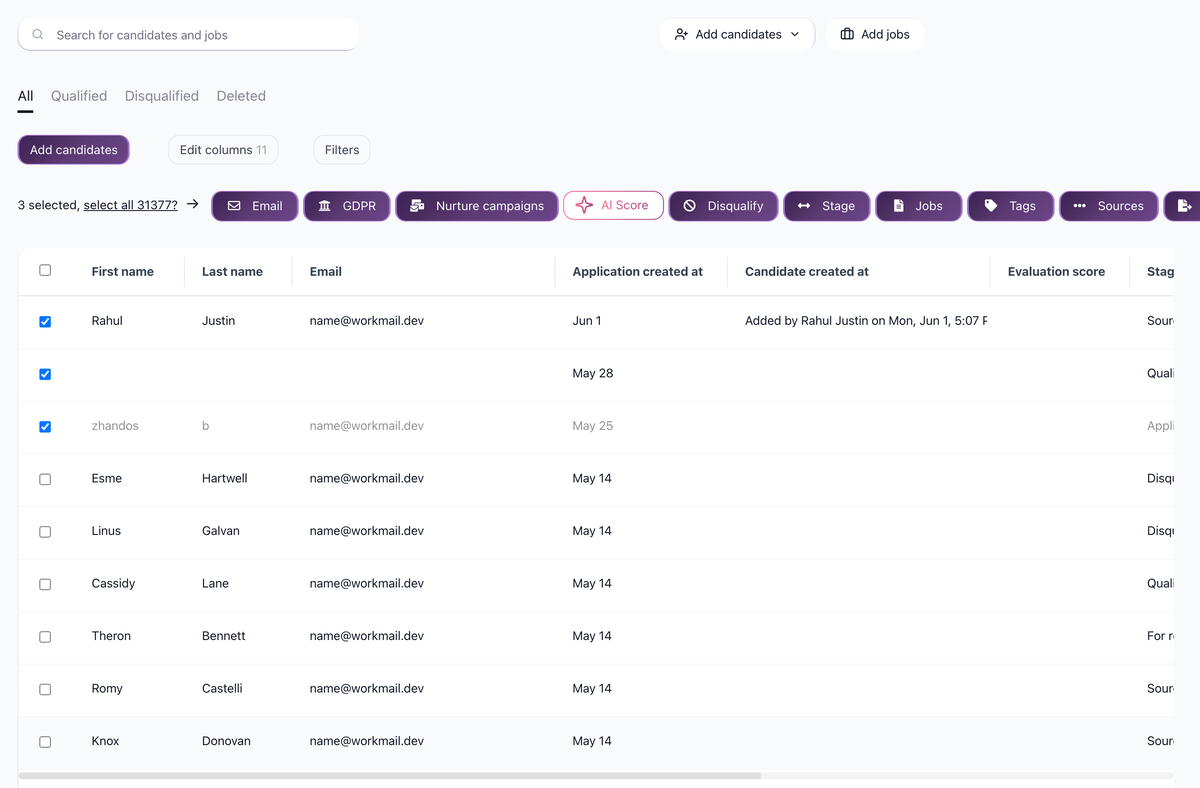
The bulk action menu includes:
- Send Email - send bulk emails using templates.
- GDPR - manage GDPR consent for the selected candidates.
- Nurture Campaigns - add to or remove from nurture campaigns.
- Assign Jobs - assign candidates to one or more jobs.
- Disqualify - bulk disqualify with a reason selection.
- Pipeline Stages - move candidates to a different stage.
- Tags - add or remove tags.
- Export - export to CSV (all columns or selected columns).
- Delete - move candidates to the Deleted tab.
- Restore - restore deleted candidates (available on the Deleted tab).
- Sources - add or remove sources.
- AI Scoring - run AI scoring on the selected candidates.
- Cancel Send - cancel scheduled emails.
Hidden candidates and bulk actions
If your plan does not include access to hidden candidates, you may see a warning:
"Please add a payment method or upgrade your plan to be able to perform bulk actions with hidden candidates (you still can delete them)"
Hidden candidates can still be deleted in bulk on lower plans, but other bulk actions on them require an upgrade.
Updated on: 18/06/2026
Thank you!