
Manage Multiple Companies on One Account
Manage Multiple Companies on One Account
A single 100Hires user can belong to multiple companies. This is the standard setup for staffing agencies managing client accounts, and for any team that runs more than one separately-billed company on 100Hires.
Switch between companies
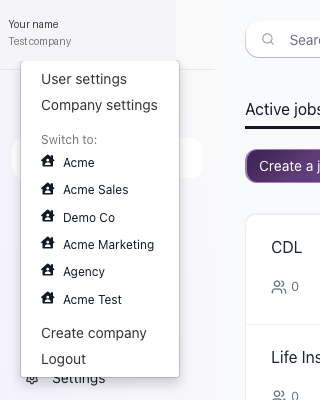
Click your company name in the top-left corner to open the company switcher dropdown. The dropdown contains:
- A list of your companies.
- A "Create company" link.
- A Logout option.
Click a company in the list to switch to it. All your candidates, jobs, settings, and team move with the active company - each company has its own data.
Create a new company
From the same company-switcher dropdown in the top-left corner, click "Create company". You become the first user in the new company and can invite teammates from Settings > Your Team.


Billing is per company
Each company account has separate billing. Each company pays for its own subscription.
Company type
Settings > Company Settings has a "Company type" option with two choices: Staffing Agency or Direct Employer. Pick the one that matches how this specific company uses 100Hires.
Updated on: 18/06/2026
Thank you!