
How to Let Candidates Book Their Own Interview Slots
How to Let Candidates Book Their Own Interview Slots
Use self-scheduling links to let candidates choose interview times that work for them, like Calendly.
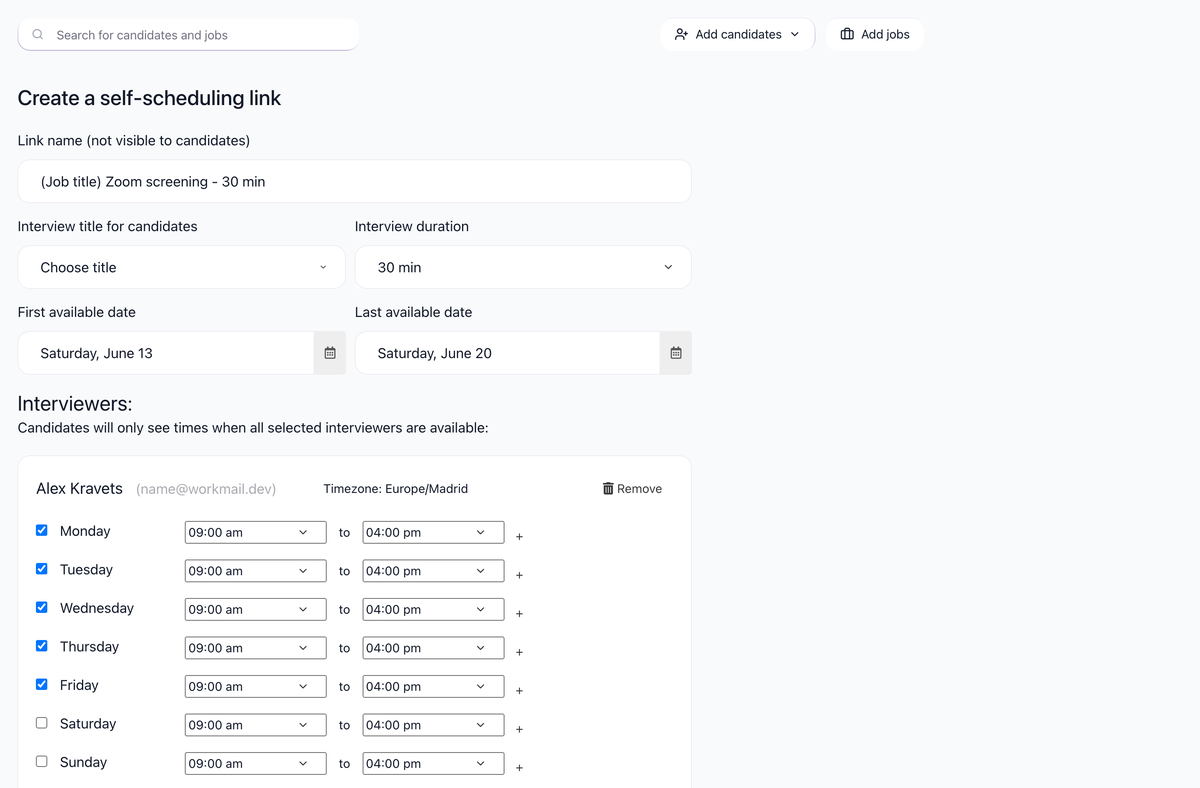
Creating a self-scheduling link
- Go to Settings / Self-Scheduling Links
- Click Create Scheduling Link
- Configure your availability:
- Available days: Which days of the week
- Time range: Hours you're available (e.g., 9 AM - 5 PM)
- Duration: Interview length
- Buffer time: Gap between interviews
- Advance notice: Minimum time before interview can be booked

- Save
Adding your meeting link
Self-scheduling links create the interview on your calendar. To give candidates a join link for a Microsoft Teams, Google Meet or Zoom personal room, save it once in Settings / User settings under Your static web meeting link, then add the Interviewer static web meeting link variable to the candidate interview email. Step by step: How to Add Your Microsoft Teams or Google Meet Link to Interview Invitations.
Using self-scheduling in email templates
Insert the scheduling link variable in your email templates:
- Go to Settings / Email Templates
- Create or edit a template
- Select the self-scheduling link variable

- When sent, it's replaced with the sender's scheduling URL
Example template:
Hi {{candidate_first_name}},

We'd like to schedule a phone screen with you.

Please pick a time that works for you:
{{self_scheduling_link}}

Looking forward to speaking with you!
How it works for candidates
- Candidate clicks the link
- They see your available time slots
- They select a slot
- Interview is automatically scheduled
- Both parties receive calendar invites
Benefits
- Eliminates back-and-forth scheduling emails
- Candidates can book at their convenience
- Respects your calendar availability
- Reduces time to schedule
Integration with calendar
Self-scheduling works best when your calendar is connected:
- Available slots reflect your actual free time
- Booked slots are blocked automatically
- New bookings appear on your calendar instantly
Related screenshots
These screenshots show the 100Hires areas used in this workflow.
Updated on: 07/10/2026
Thank you!