
Understanding Email and Nurture Campaign Stats
Understanding Email and Nurture Campaign Stats
Track email performance and nurture campaign effectiveness to optimize your candidate outreach.
Email stats
Accessing email stats
Go to Settings / Integrations, then click Email stats next to your connected email account.
What email stats show
Metric | Description |
|---|---|
Sent | Emails successfully delivered |
Scheduled | Emails waiting to send |
Failed | Emails that couldn't be delivered |
Queue size | Total pending emails |
Using email stats
Monitor daily limits:
Check if scheduled emails are backing up due to sending limits.
Track failures:
Identify bounced emails and invalid addresses.
Plan campaigns:
Estimate time to complete large sends based on queue size.
Nurture campaign stats
Accessing campaign stats
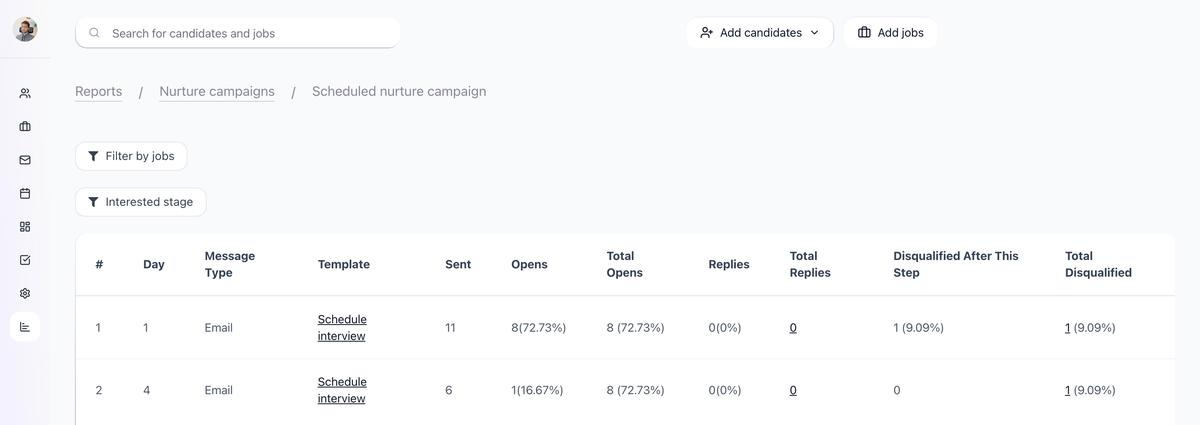
Go to Reporting / Nurture Campaigns
Available metrics
Metric | Description |
|---|---|
Total enrolled | Candidates who entered the campaign |
Active | Currently receiving sequence |
Completed | Finished all steps |
Replied | Responded to any message |
Unsubscribed | Opted out |
Per-step metrics

For each campaign step:
- Emails sent
- Open rate
- Reply rate
- Click rate (if links included)
Conversion Tracking
- Reply rate overall
- Stage movement rate
- Time to response
Key performance indicators
Open rates
Rating | Open Rate |
|---|---|
Excellent | 40%+ |
Good | 25-40% |
Average | 15-25% |
Low | Below 15% |
Reply rates
Rating | Reply Rate |
|---|---|
Excellent | 15%+ |
Good | 8-15% |
Average | 3-8% |
Low | Below 3% |
Improving email performance
Low open rates
Subject line issues:
- Make subject lines specific and personalized
- Avoid spam trigger words
- Test different approaches
Delivery problems:
- Check sender reputation
- Verify email authentication (SPF, DKIM)
- Review daily sending limits
Low reply rates
Content issues:
- Make messages more relevant
- Clear call to action
- Personalize beyond just name
Targeting issues:
- Better candidate matching
- Review list quality
- Segment by job type or seniority
High bounce rates
List quality:
- Use email validation (ZeroBounce)
- Remove invalid addresses
- Verify before large campaigns
Campaign optimization
Compare campaigns
Look at performance across different campaigns:
- Which templates perform best
- Optimal number of follow-ups
- Best timing between steps
A/B testing
Test variations:
- Subject lines
- Email length
- Call to action
- Send timing
Sequence length
Typical performance pattern:
- Step 1: Highest open rate
- Steps 2-3: Lower but still valuable
- Steps 4+: Diminishing returns
Most responses come from first 3 steps.
Reporting frequency
Daily
- Check for delivery failures
- Monitor queue size
Weekly
- Review open and reply rates
- Identify underperforming campaigns
Monthly
- Analyze overall trends
- Compare against benchmarks
- Adjust strategies
Related screenshots
These screenshots show the 100Hires areas used in this workflow.

Updated on: 07/08/2026
Thank you!