
All Supported Job Boards: Posting, Timing, Requirements
All Supported Job Boards: Posting, Timing, Requirements
Overview
100Hires distributes every job to a network of job boards from a single posting flow. Write the description once, toggle the boards, and 100Hires handles syndication and tracking.
Some boards (notably Indeed and LinkedIn) verify your company before the first post goes live. Free-trial accounts go through a verification queue that takes up to 72 hours; an active subscription clears the queue faster.
Supported boards
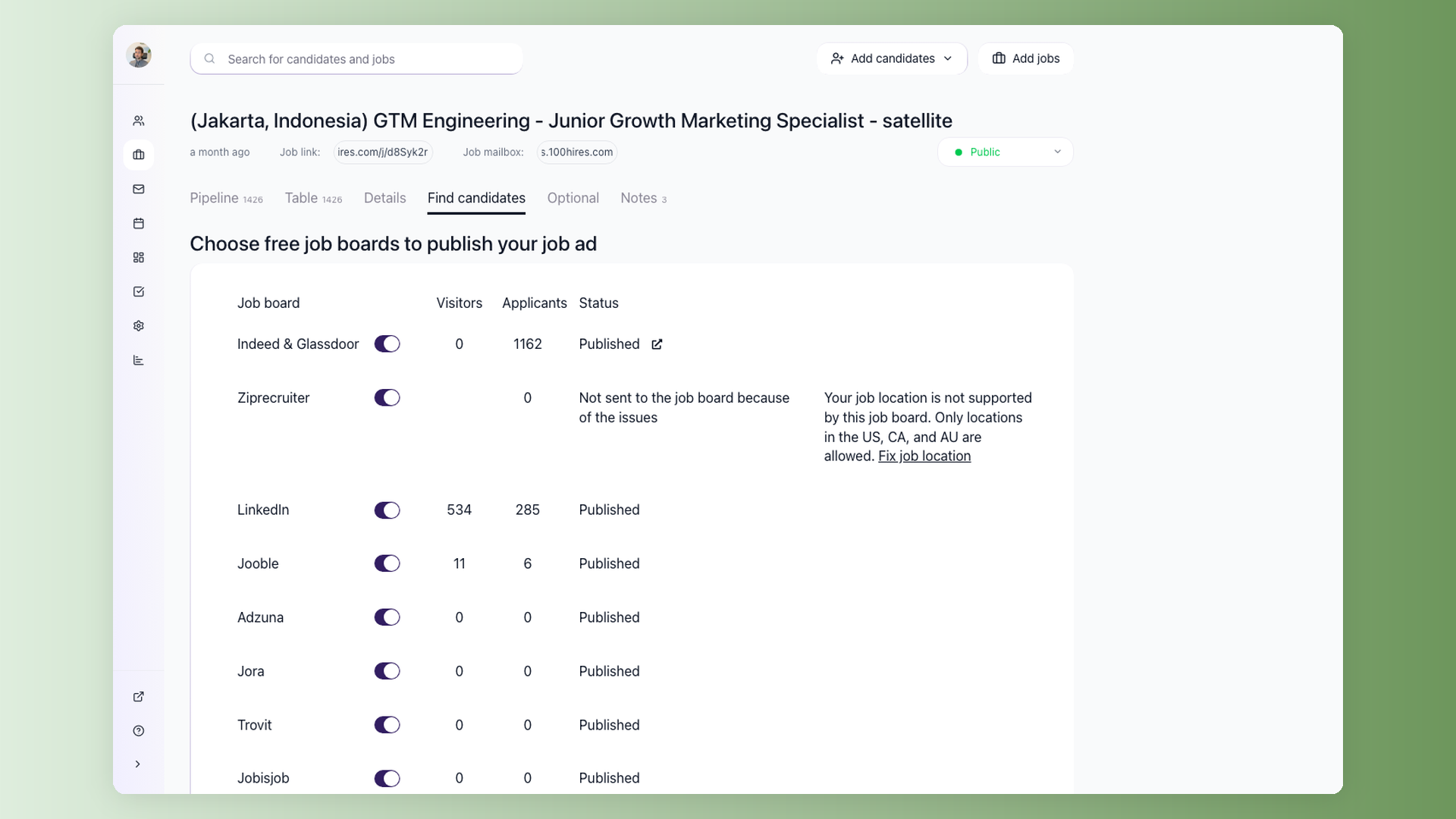
100Hires posts to 13 job boards from the Find Candidates tab on each job:
- Indeed
- Glassdoor
- ZipRecruiter
- Jooble
- Adzuna
- Jora
- Trovit
- Jobisjob
- Monster
- CareerJet
- Google Jobs
- Talent.com
You will count 12 toggles, not 13: Indeed and Glassdoor share a single Indeed & Glassdoor toggle, because Glassdoor is served from the same listing. Every other board has its own toggle.
The toggles and status indicators on the Find Candidates tab reflect the current posting state. Some boards can require extra verification or processing time.
How long until a job is live
There are three separate waits, and they stack. Keeping them apart is the fastest way to tell "normal" from "stuck".
1. First-post verification (one time, per company). Free-trial accounts go through a verification queue before anything is distributed - up to 72 hours. An active subscription gets first priority and clears the queue faster. This wait applies once, not to every job.
2. Submission from 100Hires (every job). Once your company is verified, 100Hires submits jobs to the boards on an hourly cycle rather than the instant you hit save. Expect up to about an hour on an active paid plan before your job leaves 100Hires.
3. Board-side processing (every job, varies per board). Each board then indexes the job on its own schedule, which 100Hires does not control. Indeed is usually the fastest - roughly an hour once your company is verified. LinkedIn is the slowest of the set.
In practice, on an active paid plan with a verified company, most jobs are live the same day. Allow a full 24 hours before treating a missing post as a problem.
Indeed
Indeed is one of the highest-volume boards 100Hires distributes to. The Indeed & Glassdoor toggle lives on the Find Candidates tab.
First-time posters from a new company go through a verification check. Free-trial accounts can wait up to 72 hours; buying a 100Hires subscription typically clears the queue faster. Staffing agencies may need additional verification.
Once the company is verified, Indeed processes edits and new posts quickly - in our experience, changes apply within roughly an hour of 100Hires submitting them.
Once a job has received at least one applicant from Indeed, an external link icon appears next to Indeed's "Published" status on the Find Candidates tab.
 Click it to view the live posting on Indeed.
LinkedIn jobs are posted through 100Hires' LinkedIn integration. The toggle lives on the Find Candidates tab alongside the other boards.
LinkedIn is slower than Indeed to process changes - job edits can take up to 24 hours to appear on the LinkedIn side. To avoid unnecessary delays, finalize the title, description, and location before posting and only edit when necessary.
ZipRecruiter
ZipRecruiter is available as a toggle on the Find Candidates tab. Applications from ZipRecruiter flow back into 100Hires the same way Indeed applications do.
Glassdoor
Glassdoor does not have its own toggle. It is covered by the Indeed & Glassdoor toggle, so turning Indeed on also puts the job in front of Glassdoor candidates. Once jobs are live, you can find your company page on Glassdoor to verify they are visible.
Google Jobs
Google Jobs is listed with the job-board distribution options in 100Hires. Keep the job public and make sure required job details are complete before checking visibility. Google indexes your listing through search rather than accepting an upload, so it appears on Google's own crawl schedule.
Jooble, Adzuna, Jora, Trovit, Jobisjob, Monster, CareerJet, Talent.com
These boards are available as toggles on the Find Candidates tab. They run as feed-based distribution channels and widen reach without extra workflow. Status is shown next to each board in the same Find Candidates view.
Verification process
Free-trial accounts go through a verification queue before the first post is distributed to boards. The standard wait is up to 72 hours. To skip the queue, buy a subscription - paid accounts get first priority for verification. Staffing agencies and brand-new domains may need additional checks.
If you edit a free-trial job after verification, it goes back to the verification queue.
To clear verification faster:
- Fill out the 100Hires company profile (website, logo, description, address).
- Use a posting email on your company domain rather than a free webmail provider.
- An active 100Hires subscription clears the queue faster than a trial.
Posting workflow
- Open the job and go to the Find Candidates tab.
- Toggle on each board you want to post to.
- Fill in any required job fields the boards expect - title, location, employment type, and a real job description. 100Hires highlights missing fields before submission.
- Save the job. 100Hires handles validation and submission to each enabled board.
Status for each board appears next to its toggle on the Find Candidates tab, along with a link to the live posting (when the partner returns one) and any error messages if posting fails.
Common issues
Post is not showing up yet. Jobs are submitted to the boards on an hourly cycle, and each board indexes on its own schedule after that, so a job saved five minutes ago will not be live yet. Wait at least 24 hours after posting before treating it as a problem.
Edits don't appear on LinkedIn immediately. LinkedIn is slower to process changes than Indeed. Give it up to 24 hours before re-editing.
Free-trial job stuck waiting. Free-trial verification can take up to 72 hours. Buying a subscription puts the job at the front of the queue.
LinkedIn not showing. See the dedicated troubleshooting article on LinkedIn visibility.
Required fields missing. Some boards require fields like salary or employment type depending on the location. 100Hires flags missing fields before submission.
If a board's status stays stuck past the expected window, contact 100Hires support with the job ID and board name - we can escalate directly with the partner.
Related article
For the quality rules each board applies after your job is submitted, see Job Post Quality Requirements: LinkedIn and Indeed Guidelines.
Related screenshots
These screenshots show the 100Hires areas used in this workflow.

Updated on: 06/08/2026
Thank you!