
Why Aren't My Jobs Showing on LinkedIn
If a 100Hires job is not visible on LinkedIn, check the job status, job-board toggle, company settings, the LinkedIn page settings, and posting errors before contacting support.
1. Confirm the job is public
LinkedIn posting starts from a public job. Open the job and confirm the status is Public.

2. Confirm LinkedIn is enabled for the job
Open the job-board settings for the job and make sure LinkedIn is toggled on.

3. Check LinkedIn company settings
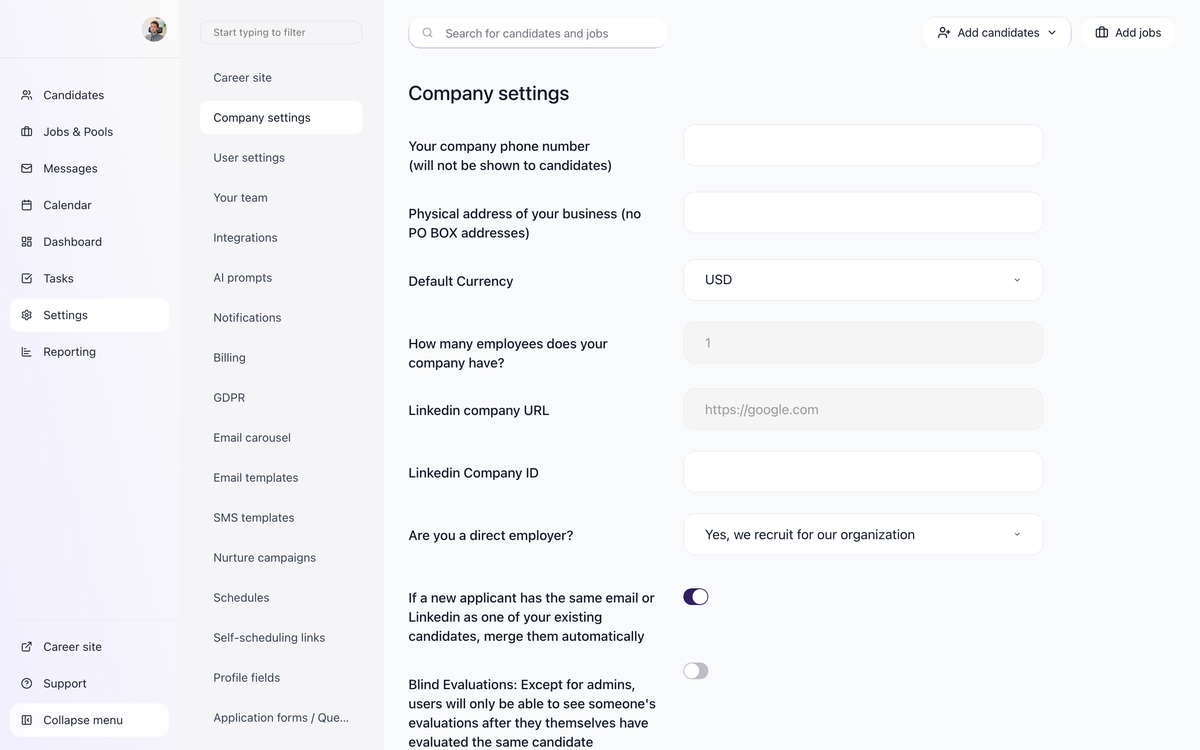
Go to company settings and confirm the LinkedIn Company URL and LinkedIn Company ID are filled in correctly. A wrong company URL or ID can prevent matching your jobs to the right LinkedIn company page.

4. Turn on basic job posting on your LinkedIn page
Since the end of March 2026, LinkedIn asks company page admins to allow free job posts from an applicant tracking system before it will show them. Until this is switched on, jobs can leave 100Hires correctly and still never appear on the page.
On your LinkedIn company page, open Settings, then Job posting, switch Enable basic job posting to On, click + Connect ATS, and select 100Hires.
If you do not see that section at all, check your admin role. LinkedIn shows the job posting settings only to super admins. A content admin sees "Share new jobs" but not the job posting section. To check, open your LinkedIn company page, click Admin tools, choose Settings, and then Manage admins, and look at the role next to your name. If you are a content admin, ask a super admin on that page to complete this step.
Step-by-step video: https://www.youtube.com/watch?v=J4n35F_rfZk
See also: How to Set Up Your LinkedIn Company Page for Job Posting
5. Check the job poster email
Each job sent to LinkedIn carries the email address of the person who posted it, and LinkedIn requires a company-domain address. Jobs posted from a free email account such as Gmail, Yahoo, or Outlook.com can be rejected. If the job poster in 100Hires uses a personal address, switch it to a company address and save the job again.
6. Review posting errors
If 100Hires shows job-board errors, read the error message first. Errors often point to missing or invalid job fields, company settings, location, or posting configuration.

7. Allow time for job-board processing
Job boards can take time to index and display a new posting after it is submitted. If the job was just published, wait for the normal board refresh cycle before assuming it failed. For LinkedIn, allow up to 24 hours, and up to 48 hours for a company page that is posting for the first time.
Common fixes
- Set the job status to Public.
- Turn LinkedIn on for the job.
- Check that the LinkedIn Company URL and Company ID match the correct company page.
- Switch on Enable basic job posting on the LinkedIn page and connect 100Hires as the ATS.
- Use a company-domain email address for the job poster.
- Fill in required job fields such as location and description.
- Avoid editing the same posting repeatedly while it is under board review.
Related article
If 100Hires shows the job as sent but LinkedIn still hides or rejects it, the cause is usually the content of the post itself. See Job Post Quality Requirements: LinkedIn and Indeed Guidelines.
When to contact support
Contact support if the job is public, LinkedIn is enabled, company settings are correct, basic job posting is switched on for your LinkedIn page, and the job still does not appear after the board has had time to process it. Include the job URL and any posting error shown in 100Hires.
Updated on: 01/08/2026
Thank you!