
Indeed Apply: How Candidates Apply to Your Jobs on Indeed
Indeed Apply: How Candidates Apply to Your Jobs on Indeed
100Hires is an Indeed ATS partner, and Indeed Apply is part of that integration. When your job is published from 100Hires to Indeed, job seekers apply directly on Indeed without leaving the job page, and the completed application, resume and screening answers arrive in your 100Hires pipeline.
This article covers what has to be in place, how to publish a job so Indeed Apply is active, what you control, and what to expect once applications start arriving.
Availability
Indeed Apply is switched on automatically for every job that 100Hires sends to Indeed. You do not paste an API key and you do not sign a separate contract with Indeed. There is no "Connect Indeed" button either: publishing the job is what turns Indeed Apply on for it. If you have turned Indeed off for a job before, see "Turning Indeed Apply off and back on" below.
Who can do this. Publishing a job to Indeed needs a user who can edit that job: an Administrator, or a Recruiter who is on the job's hiring team. Interviewers cannot publish jobs. No extra permission or integration-specific role is involved, see How to Invite Team Members and Understanding User Roles.
Two things sit outside this article. To sponsor jobs or manage them inside Indeed's own employer dashboard, you link your Indeed employer account separately, see How to Link Your Indeed Employer Account. To have your jobs show under your own employer brand on Indeed, claim your company page, see How to Claim Your Indeed Company Page and Match It in 100Hires.
Prerequisites
Before a job reaches Indeed, all of the following have to be true. If one is missing, 100Hires holds the job back and shows you the reason on the job's Find candidates tab.
- Verification has cleared. Jobs from accounts on a free trial are verified before they reach the free job boards, which can take up to 72 hours. Buying a subscription moves the job to the front of the queue. Editing a verified trial job can send it back for verification. Staffing and recruiting agencies may need additional checks.
- Your company logo is uploaded and your company name matches your Indeed profile. Both are set under Career site settings. If either is missing, the job is held back with the message "Upload your company logo and ensure the company name matches your Indeed profile".
- The job has a location Indeed accepts. On-site jobs need a city, region or postal code: "Austin, TX, USA" works, "Texas" on its own does not. Remote jobs need at least a country, and a statewide remote job also needs the state. Indeed does not accept every country, and an unsupported one is flagged on the same tab.
- The job description is at least 50 words. Shorter descriptions are rejected, and 100Hires tells you so before the job is sent.
- The salary, if you set one, is complete. A job with a salary needs a minimum value, and the minimum has to be lower than the maximum. Otherwise Indeed is blocked with "specify the minimum salary for this job to enable the integration". A job with no salary at all passes.
- The job status is Public. Only Public jobs go to Indeed. Every other status is either held back or, for jobs that were already live, removed from Indeed.
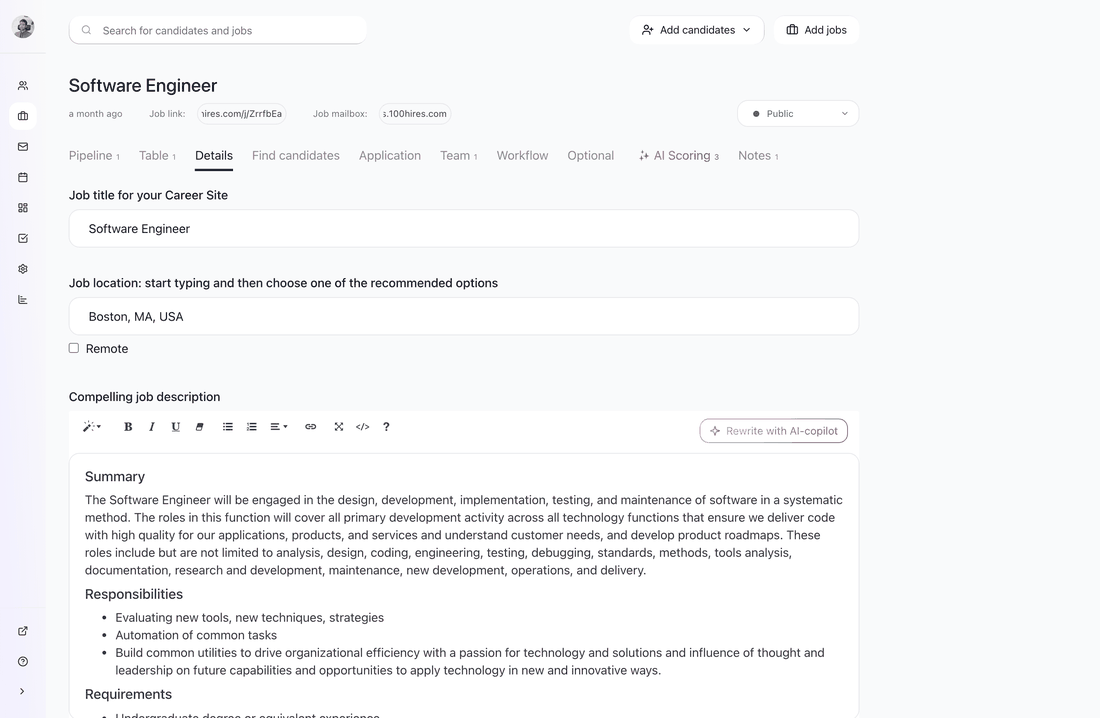
Title, location and description all live on the job's Details tab.
Step 1: Choose what you ask applicants
Indeed Apply presents your questions to the candidate inside Indeed's own application flow, so the application form you build in 100Hires is the application the candidate fills in on Indeed.
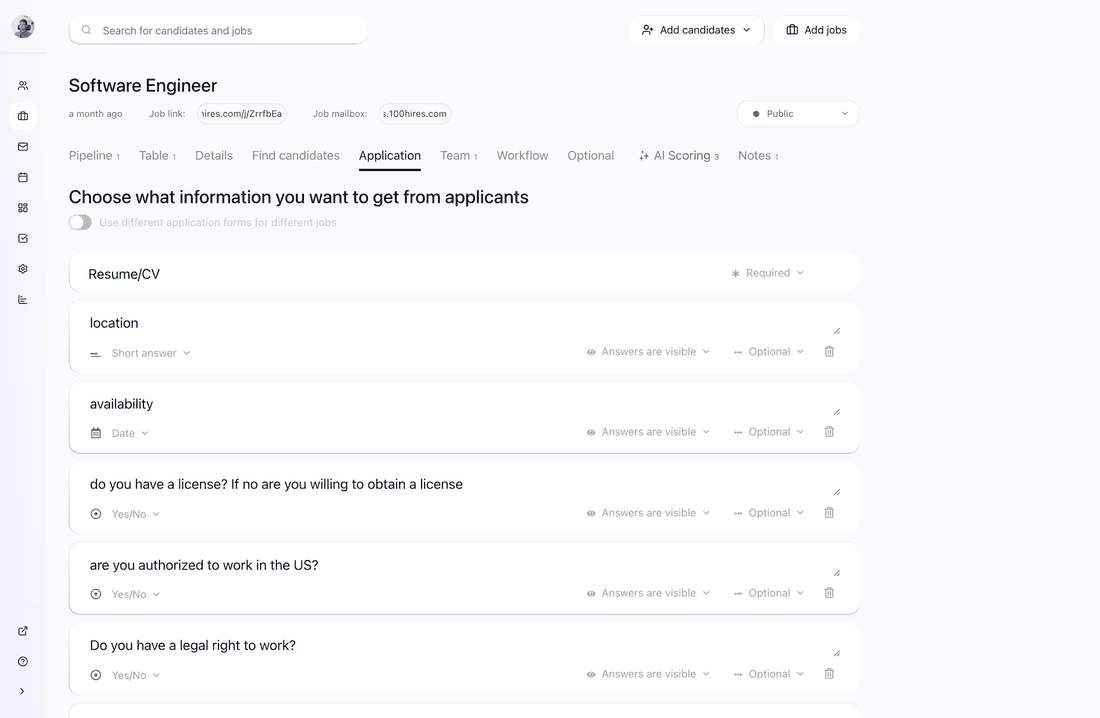
Open the job's Application tab. Each item has a Required or Optional setting, and the same menu lets you hide it:
- Resume/CV - set it to Required to tell Indeed a resume is expected before the candidate can submit.
- Your own questions - short answer, date, yes/no, multiple choice and the other types are passed to Indeed as screening questions.
- Hidden items are not sent to Indeed at all. Do not confuse this with Answers are visible, which only controls whether your own team sees an answer.
A few details are worth knowing:
- First name, last name, email and phone are collected by Indeed itself, so they are never repeated as screening questions. Whether a phone number and a cover letter are required, optional or not asked at all follows the same settings on this tab.
- For jobs located in the United States, the three standard demographic questions from the question library (gender and race or ethnicity, protected veteran status, disability) are passed as Indeed's separate voluntary block rather than as ordinary screening questions. A demographic question you write yourself is sent as an ordinary screening question, so use the library versions.
Keep the list short. Every extra question is one more step between a job seeker and a completed application.
Step 2: Publish the job to Indeed
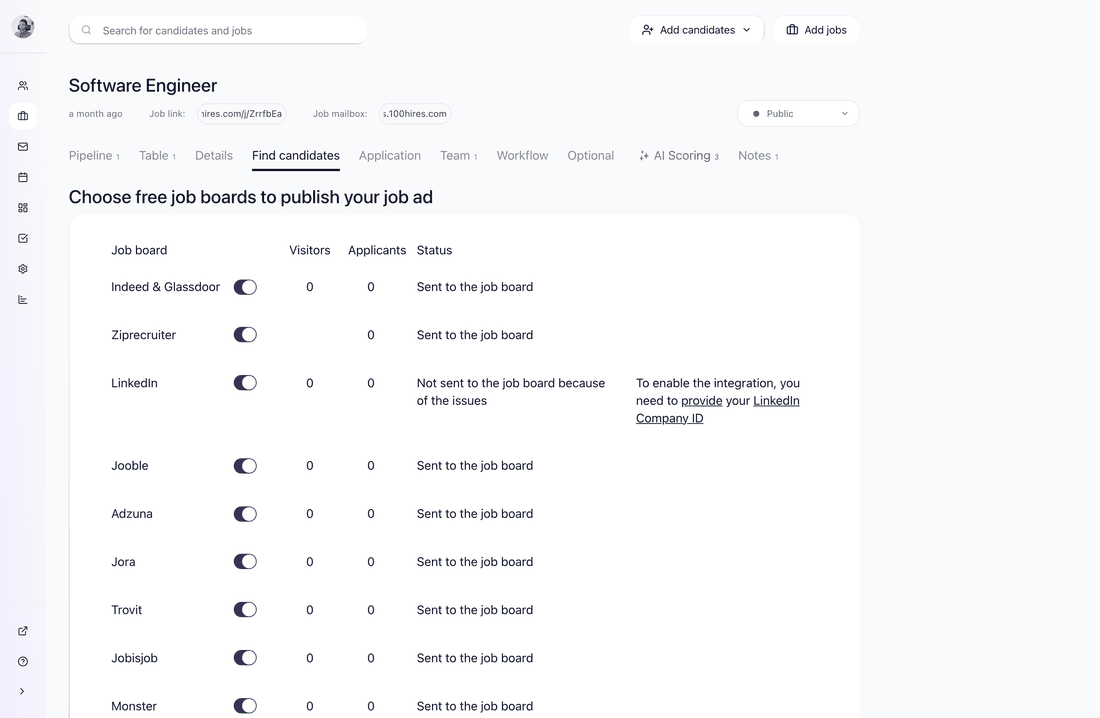
Set the job status to Public, then open the job's Find candidates tab. Indeed is listed as Indeed & Glassdoor, because one listing serves both sites. Check that the toggle next to it is on.
That is the whole setup. There is no separate Indeed Apply switch.
If the row still does not move to Sent to the job board after you have cleared every issue it lists, email support@100hires.com: Indeed distribution can also be blocked at the account level, and that is something we lift from our side.
Step 3: Check the status
The same Find candidates tab shows a per-board status, along with the visitors and applicants counted for each board:
- Sent to the job board - the job has been handed to Indeed. Indeed usually reflects a new or edited job within about an hour; allow a full 24 hours before assuming something is wrong.
- Not sent to the job board because of the issues - the listed problem has to be fixed first. Common causes are a missing company logo, a description shorter than 50 words, or a location Indeed cannot place.
To open your live posting, see How to View Your Indeed Job Posting.
Turning Indeed Apply off and back on
Indeed Apply follows the Indeed job board toggle, so turning Indeed off for a job also turns Indeed Apply off for it.
To stop sending a job to Indeed, open the job's Find candidates tab and switch off the toggle next to Indeed & Glassdoor. Moving the job out of the Public status has the same effect on every board at once.
To re-enable Indeed Apply on a job you previously opted out of:
- Open the job and set its status back to Public if it is not Public already.
- Go to the Find candidates tab.
- Switch the toggle next to Indeed & Glassdoor back on.
- Check the prerequisites above are still met. If something is missing, the row shows the reason instead of sending the job.
- Watch the status column: it changes to Sent to the job board once the job has been handed to Indeed. Allow the usual hour, and up to 24 hours, before the listing is visible again.
The job keeps its candidates and its pipeline throughout. Applications that arrived earlier from Indeed stay where they are.
What candidates see
On Indeed, your job carries Indeed's own apply button instead of a link out to an external form. The candidate applies inside Indeed with the profile and resume they already have there, and answers the questions you configured. Nothing is asked twice.
The same flow can also start from your 100Hires career site, where the job page can show an Apply with Indeed button next to the regular application form. It hands the candidate to Indeed's flow instead of making them retype what Indeed already knows.
What you receive
Each application Indeed delivers arrives in 100Hires as a candidate in the job's pipeline:
- The candidate lands in the first stage of your pipeline with Indeed as the source.
- If the candidate supplied a resume, it is attached to their profile.
- Answers to your screening questions are stored on the application and shown on the candidate's profile.
- Your normal automations run on these candidates exactly as they do on candidates from any other source.
An application can arrive with an answer missing, so check the profile before acting on it.
Status updates sent back to Indeed
100Hires reports candidate progress back to Indeed, so Indeed can tell job seekers what happened to their application. When you move a candidate to another stage, we send Indeed the matching status and the name of the stage you moved them into. Supported statuses include new, in review, liked, contacted, screening, assessing qualifications, interviewing, background check, verifying eligibility, offer made, offer declined, withdrawn, hired and not selected.
Stages whose names match a known status map automatically. Unusual custom stage names are matched as closely as we can, and anything that cannot be placed is reported as unmapped. The update carries the status and the stage name, not the candidate's resume, notes, messages or evaluations.
Troubleshooting
The job is not on Indeed yet. Check the per-board status on the Find candidates tab first. If it says "Sent to the job board", give it up to 24 hours. If your company is on a free trial and not yet verified, verification can take up to 72 hours. See also Post Jobs to Indeed from 100Hires Automatically.
The job disappeared after I edited it. Edits to a job on a free trial can send it back into the verification queue. It returns once verification completes.
I want more visibility. Sponsoring puts the job higher in Indeed's search results. See How to Sponsor Jobs on Indeed.
Candidates are applying but the quality is off. Indeed matches on what the posting says. Add a salary range, employment type and experience level on the job's Optional tab, and see Job Post Quality Requirements: LinkedIn and Indeed Guidelines.
Still stuck? Email support@100hires.com with the job link and we will check the Indeed side for you.
Updated on: 17/09/2026
Thank you!