
How Nurture Campaign Scheduling Works
How Nurture Campaign Scheduling Works
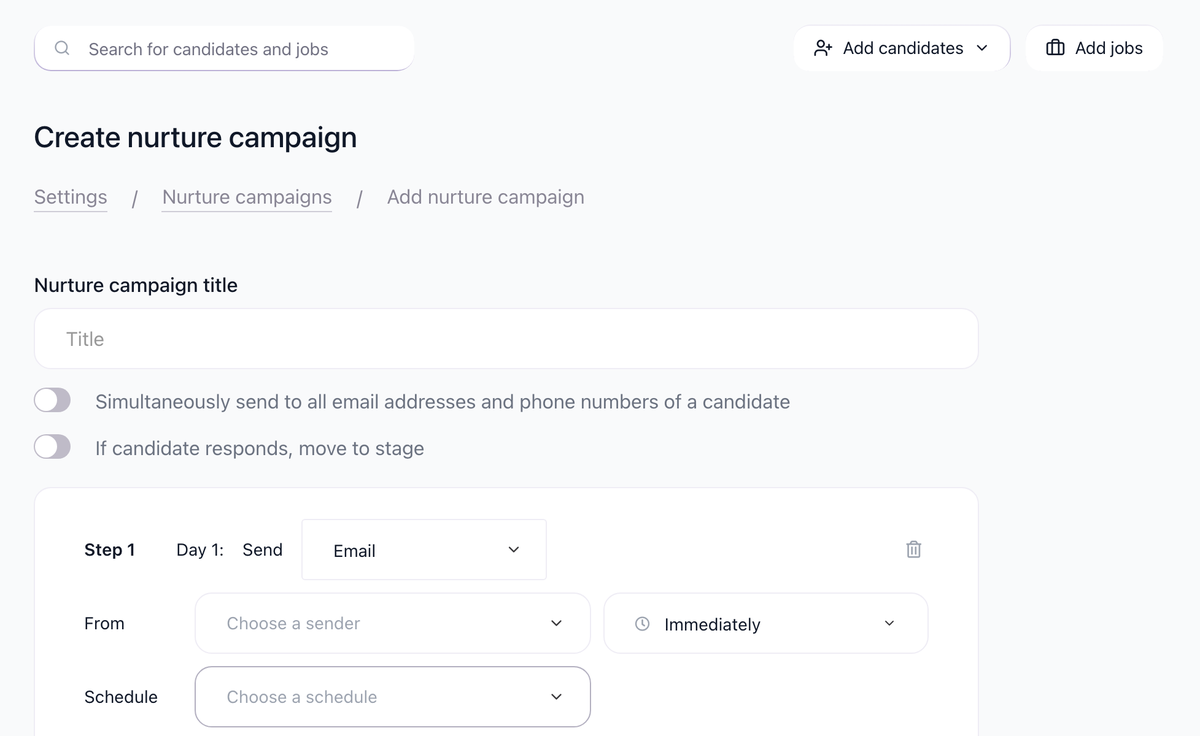
Understand how 100Hires schedules nurture campaign emails to reach candidates at the right time.
Scheduling Components
Nurture campaign timing is controlled by three settings:
- Delay between steps - How long to wait after previous step
- Work schedule - Which days and hours emails can send
- Candidate timezone - Adjusts timing based on candidate location
Delay Between Steps
Set how long to wait before sending each step:
Unit | Use Case |
|---|---|
Minutes | Quick follow-ups, urgent messages |
Hours | Same-day follow-ups |
Days | Standard outreach cadence |
Example sequence:
- Step 1: Immediately after entering stage
- Step 2: 3 days after Step 1
- Step 3: 5 days after Step 2
- Step 4: 7 days after Step 3
Work Schedule
Define when emails can be sent:
Days of Week
Select which days emails should send:
- Typical: Monday through Friday
- Some roles: Include Saturday
- Urgent hiring: All days
Hours
Set the time window:
- Morning: 9 AM - 12 PM
- Business hours: 9 AM - 5 PM
- Extended: 8 AM - 6 PM
Example: Monday-Friday, 9 AM - 4 PM
What Happens Outside Schedule
If an email is scheduled outside work hours:
- Email waits in queue
- Sends at next available time within schedule
- Maintains proper sequence
Example:
- Step 2 due on Saturday
- Work schedule is Monday-Friday
- Email sends Monday morning instead
Candidate Timezone
100Hires uses candidate timezone when known:
How Timezone Is Detected
- IP address from application form submission
- Shows candidate's local time in their profile
Timezone-Aware Sending
If work schedule is 9 AM - 4 PM:
- Candidate in New York: Receives 9 AM - 4 PM EST
- Candidate in London: Receives 9 AM - 4 PM GMT
- Candidate in Tokyo: Receives 9 AM - 4 PM JST
When Timezone Is Unknown
If candidate location isn't detected:
- System uses your account timezone
- Or company default timezone
Example Configuration
Sourcing Campaign Setup:

Setting | Value |
|---|---|
Step 1 delay | 15 minutes after stage move |
Step 2 delay | 3 days |
Step 3 delay | 5 days |
Work schedule days | Monday - Friday |
Work schedule hours | 9 AM - 4 PM |
Timezone | Candidate's timezone |
Result:
- Candidate enters "Outreach" stage Monday 2 PM
- Step 1: Monday 2:15 PM (their time)
- Step 2: Thursday 9 AM (their time)
- Step 3: Tuesday 9 AM (next week, their time)
Tips
Optimal Timing
- Tuesday-Thursday typically have best open rates
- Mid-morning (10-11 AM) often works well
- Avoid Monday mornings and Friday afternoons
Delay Strategy
- First follow-up: 2-3 days
- Subsequent follow-ups: Increase intervals
- Don't send too frequently (appears desperate)
Schedule Considerations
- Match recipient work patterns
- B2B: Business hours
- Retail/hospitality: May include evenings
- International: Consider timezone diversity
Monitoring scheduled emails
Check scheduled emails:
- Go to Reporting / Email
- View email stats per account
- See scheduled vs sent counts

If too many emails queue up, you may need to adjust daily sending limits.
Related screenshots
These screenshots show the 100Hires areas used in this workflow.
Updated on: 07/08/2026
Thank you!