
Post Jobs to Indeed from 100Hires Automatically
Post Jobs to Indeed from 100Hires Automatically
100Hires distributes your jobs to Indeed automatically. Publish once on 100Hires and the job shows up on Indeed without re-typing anything on Indeed's side.
How Indeed posting works
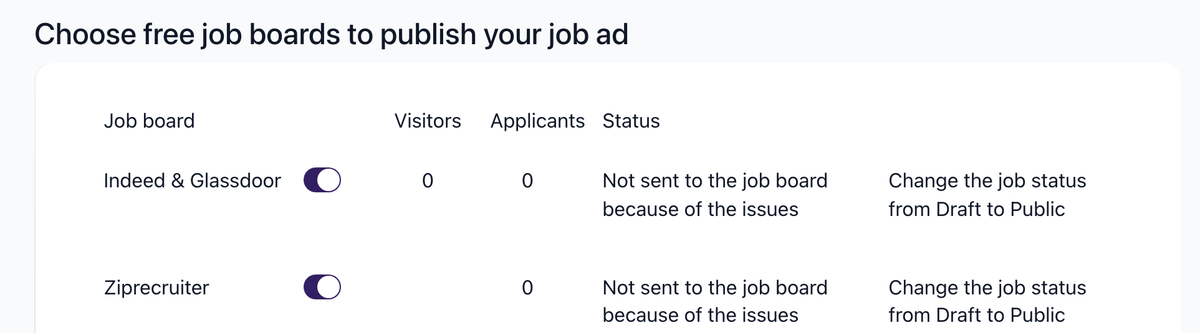
Indeed is one of the job boards 100Hires posts to as part of multi-board distribution. Open the job's Find Candidates tab to see the toggle, labeled Indeed & Glassdoor because one listing serves both, along with the other boards (ZipRecruiter, LinkedIn, Jooble, Adzuna, Jora, Trovit, Jobisjob, Monster, CareerJet, Google Jobs, Talent.com). With Indeed enabled and the job set to Public, the job is distributed to Indeed.
Verification timing
Jobs on a free trial go through a verification step before they reach the job boards. This can take up to 72 hours. Buying a subscription moves the job to the front of the verification queue, so it goes live faster. Staffing agencies may need additional verification.
After verification, Indeed itself typically reflects new or edited jobs within about an hour.
Required job fields
To create and publish a job on 100Hires you need at minimum:
- Job title (used on the careers site)
- Job location (city + country minimum, full address preferred even for remote jobs - it improves job board distribution)
- Job description
A salary range is highly recommended - you can use the Recommend Salary button to generate one based on title and location. Filling out more fields (employment type, experience level, etc.) generally improves how the job is matched on Indeed and other boards.
Checking job status on Indeed
Open the job in 100Hires and go to the Find Candidates tab. Each enabled board shows its status. Once Indeed has published the job and you receive at least one candidate from Indeed, an external link icon appears next to Indeed's "Published" status
 - click it to view the live posting on Indeed.
It is normal to wait at least 24 hours after posting before assuming something is wrong. You can also search your company page on Indeed directly to verify the job is live.
Sourcing from your Indeed employer dashboard
Separate workflow: the 100Hires Chrome extension also works on your Indeed employer dashboard, so you can pull applicants from Indeed into 100Hires as candidates. This is the reverse direction (from Indeed into 100Hires) and is independent of auto-posting. See the Chrome extension article for setup.
Common issues
"My job is not on Indeed yet." Check the Find Candidates tab in 100Hires for the per-board status. If you are on a free trial, verification can take up to 72 hours - buying a subscription skips the line.
"I edited the job and now it disappeared." Edits to a free trial job can send it back into the verification queue. It will come back once verification completes.
Related article
Indeed reviews every post against its own rules on pay, location, and content. See Job Post Quality Requirements: LinkedIn and Indeed Guidelines before you publish.
Removing a job from Indeed
Set the job's status to a non-Public status (Filled, Archived, Draft, etc.) in 100Hires. The post is removed from Indeed without you needing to log into Indeed to take it down.
Updated on: 06/08/2026
Thank you!