
Job posting API: create and distribute jobs with Developer API v2
Job posting API: create and distribute jobs with Developer API v2
The 100Hires job posting API lets you create jobs, update their details, publish or archive them, and control job-board distribution from your own system. You can also read public jobs for a custom career site and submit applications programmatically.
Use the live OpenAPI specification as the source of truth for request fields, response schemas, and current endpoints.
Generate an API key
- Open 100Hires.
- Go to Settings > Integrations.
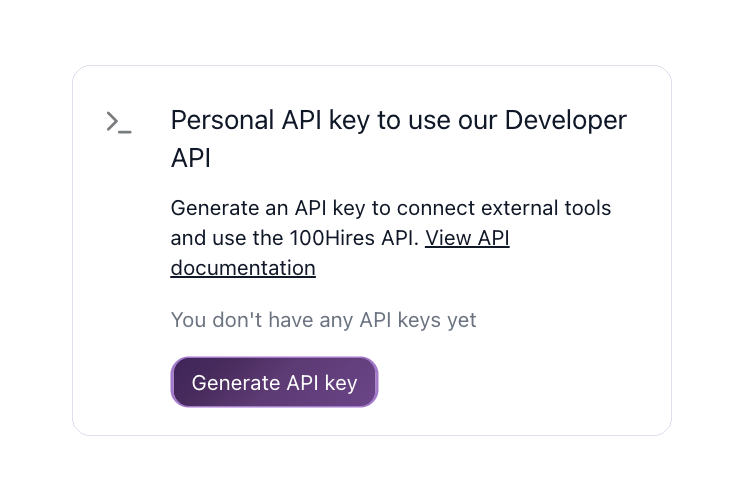
- Find Personal API key to use our Developer API.
- Select Generate API key and store the key securely.
API keys are scoped to a user and company. Your company account must be verified before the key can authenticate successfully. If a key returns 401 Unauthorized after verification, contact 100Hires support.
Base URL and authentication
Use this base URL:
https://api.100hires.com/v2For authenticated Developer API endpoints, send the API key as a bearer token and use JSON for request bodies:
Authorization: Bearer YOUR_API_KEY
Content-Type: application/json
Recommended job posting workflow
Create new jobs as drafts first. Review the returned job, then make it public and activate the required job boards. This keeps incomplete jobs from appearing on your career site or being sent for distribution.
1. Create a draft job
Send POST /jobs. The required fields are status, title, description, location_city, and location_country.
curl --request POST 'https://api.100hires.com/v2/jobs' \
  --header 'Authorization: Bearer YOUR_API_KEY' \
  --header 'Content-Type: application/json' \
  --data '{
    "status": "Draft",
    "title": "Senior Software Engineer",
    "description": "<p>Describe the role, responsibilities, and requirements here.</p>",
    "location_city": "Madrid",
    "location_country": "Spain",
    "is_remote": true,
    "salary_min": 70000,
    "salary_max": 90000,
    "salary_currency": "EUR",
    "salary_period": "annually"
  }'
The response contains the job ID needed by the following requests. You can also provide an existing application form or workflow ID. If you omit them, 100Hires creates defaults for the new job.
Use PUT /jobs/{id} to update job details later. Retrieve valid values from the taxonomy endpoints in the OpenAPI specification, including GET /statuses, GET /employment-types, GET /departments, GET /categories, GET /education-levels, and GET /experience-levels.
2. Make the job public
Send PATCH /jobs/{id}/status after the job is ready:
curl --request PATCH 'https://api.100hires.com/v2/jobs/JOB_ID/status' \
  --header 'Authorization: Bearer YOUR_API_KEY' \
  --header 'Content-Type: application/json' \
  --data '{"status":"Public"}'
A public job is visible on your 100Hires career site and can accept applications. Making a job public does not override a job board's own content, location, or account requirements.
3. Check and activate job boards
First, send GET /jobs/{id}/job-boards to retrieve the board IDs available for that job and their current state.
Activate selected boards with POST /jobs/{id}/job-boards:
curl --request POST 'https://api.100hires.com/v2/jobs/JOB_ID/job-boards' \
  --header 'Authorization: Bearer YOUR_API_KEY' \
  --header 'Content-Type: application/json' \
  --data '{"boards":["indeed","linkedin"]}'
Use DELETE /jobs/{id}/job-boards with the same boards request body to deactivate selected boards. Check the job-board state again after a change because distribution can be queued or rejected when a job does not meet a board's requirements.
The same board states and validation details are visible in the job's Find candidates tab.
Manage job boards in batches
Use /jobs/batch-job-boards when the same distribution change applies to several jobs:
GET /jobs/batch-job-boardsreads board states for multiple jobs.POST /jobs/batch-job-boardsactivates boards for multiple jobs.DELETE /jobs/batch-job-boardsdeactivates boards for multiple jobs.
Example activation request:
{
  "jobs": [101, 102, 103],
  "boards": ["indeed"]
}
Build a custom career site
The public career-site endpoints cover a different part of the workflow:
GET /career-site/jobslists public jobs.GET /career-site/jobs/{id}returns one public or unlisted job. Draft, archived, and internal jobs are not returned.POST /career-site/applicationssubmits an application.
Career-site endpoints use your company slug rather than the Developer API bearer token. Send it in the X-Company-Slug header, or use the company_slug query parameter where supported.
These endpoints are useful when your website provides the job-listing and application interface while 100Hires remains the recruiting system of record.
Other Developer API resources
Developer API v2 also covers candidates, applications, pipeline moves, notes, messages, interviews, forms, AI scores, hiring teams, and webhooks. Start with the OpenAPI specification instead of copying endpoint lists from an older integration.
Troubleshooting
401 Unauthorized: confirm that the bearer token is current and the company account is verified.400 Bad Request: compare the request body with the current OpenAPI schema and check required fields.403 Forbidden: confirm that the API key's user and company have access to the requested resource.429 Too Many Requests: pause and retry with backoff. Contact support if the integration needs a higher limit.- A job is public but not on a board: read
GET /jobs/{id}/job-boardsand check the Find candidates tab for validation details. Boards can require a longer description, supported location fields, or account-specific setup.
Related articles
- MCP Server and Webhooks: Connect AI Assistants and External Systems
- Use 100Hires Webhooks for Custom Integrations
- How to Embed Jobs on Your Website
Updated on: 17/07/2026
Thank you!