
Candidate Merge: Auto-merge Duplicate Applicants
Candidate Merge: Auto-merge Duplicate Applicants
When the same person applies again, uploads a resume again, or is sourced again, you usually want one candidate record instead of two. Duplicate records split notes, messages, scores, and application history across separate profiles.
100Hires supports automatic duplicate handling for incoming applicants when the same stable identifier is present.
Auto-merge duplicate applicants
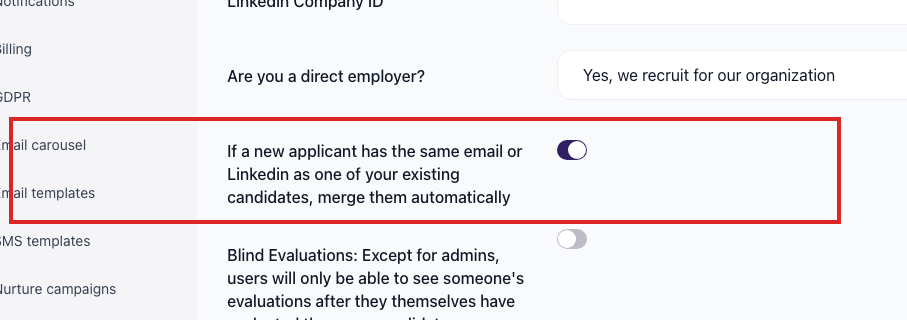
In Settings > Company Settings, use the Auto-merge duplicate applicants toggle.
When this toggle is on, a new application that matches an existing candidate by email or LinkedIn URL is attached to the existing candidate instead of creating a second candidate record.
How duplicates are detected
Auto-merge uses stable identifiers from the incoming candidate data:
- Email address
- LinkedIn URL
A candidate without either field cannot be auto-matched reliably. If you import or create candidates without email or LinkedIn URL, review the results for duplicates.
Chrome extension duplicate checks
The 100Hires Chrome extension can also detect candidates that already exist in your database while you source from supported sites such as LinkedIn, Gmail, GitHub, and others. Use that warning to update the existing candidate instead of creating another record.
Best practices
- Keep auto-merge enabled for normal applicant intake.
- Make email required on application forms whenever possible.
- Capture LinkedIn URL when sourcing manually or through the Chrome extension.
- Before deleting a possible duplicate, confirm that you do not need its notes, messages, files, or application history.
What is not covered here
This article covers the auto-merge behavior confirmed in product documentation. If you need to combine two existing candidate records manually, contact support so we can confirm the safest option for your account and data shape.
Related screenshots
These screenshots show the 100Hires areas used in this workflow.


Updated on: 18/06/2026
Thank you!