
How to Assign Multiple Jobs to Candidates
How to Assign Multiple Jobs to Candidates
A single candidate can be assigned to multiple jobs simultaneously, allowing you to consider them for different positions.
Assign from candidate profile
- Open the candidate's profile
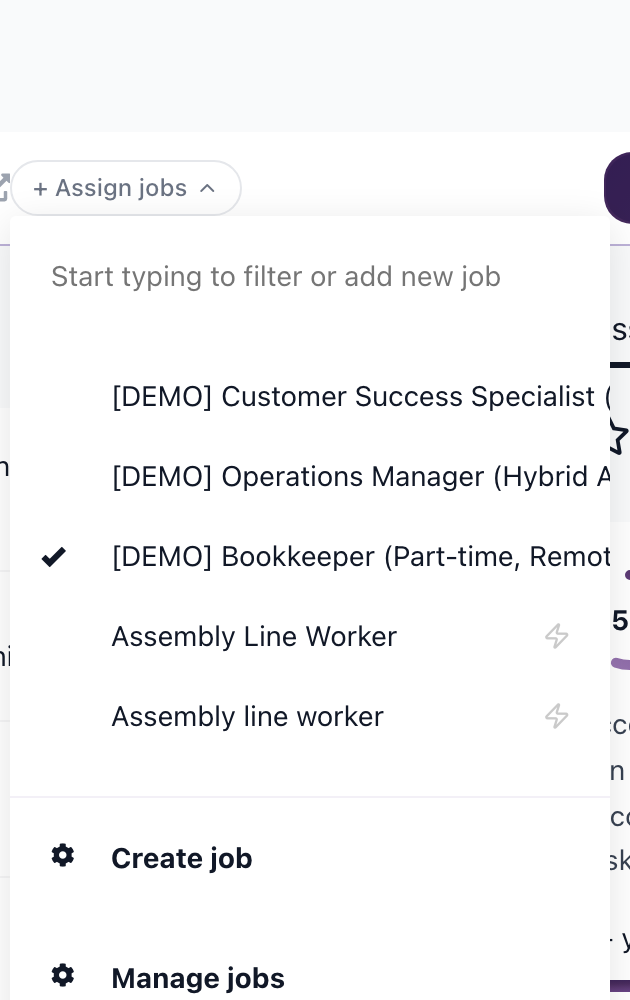
- Look for the Assign Jobs link in the header (near the current job name)
- Click to open the job dropdown
- Select additional jobs to assign
- Choose a pipeline stage for each job
Assign using bulk actions
- Select candidates using checkboxes
- Click Jobs

- Select the job(s) to assign

- Choose a pipeline stage

- All selected candidates are assigned
How multiple job assignment works
- Each job assignment has its own pipeline stage
- Moving a candidate in one job's pipeline doesn't affect other jobs
- Disqualifying in one job doesn't disqualify in others
- The candidate appears in each job's pipeline separately
Viewing a candidate's jobs
In the candidate profile:
- Look at the header area
- You'll see all assigned jobs listed


Removing a job assignment
- Open the candidate profile
- Find the job assignment dropdown
- Click the ✔ next to the job you want to remove

- The candidate is removed from that job's pipeline
Use cases
- Consider for multiple roles: Same candidate fits several open positions
- Internal mobility: Track an employee for different internal opportunities
- Fallback positions: If candidate doesn't get first choice, consider for second
Updated on: 07/08/2026
Thank you!