
Understanding the Candidate Profile
Understanding the Candidate Profile
The candidate profile is the main workspace for reviewing one candidate. Use it to check profile fields, resume details, contact information, applications, messages, internal discussion, files, tasks, AI score, and evaluation history.
Open a candidate profile
Open a candidate from a candidate list, job pipeline, search result, or related job view.
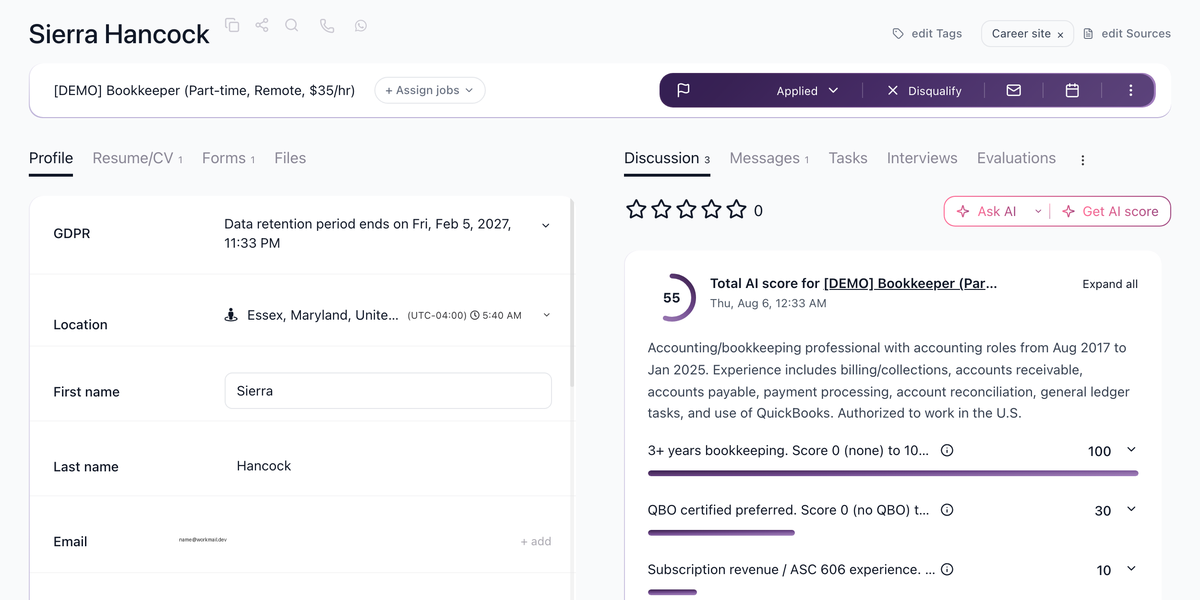
Use the profile tabs
The profile keeps candidate information and hiring activity in one place. Use the tabs to move between resume/profile details, discussion, messages, evaluations, and jobs.

Add internal context
Use Discussion for internal notes, mentions, and team collaboration about the candidate. This keeps hiring-manager feedback separate from candidate-facing messages.

Review candidate communication
Use Messages to review emails and SMS history with the candidate and send follow-up communication from 100Hires.

Best practices
- Keep candidate notes factual and job-related.
- Use tags and applications to keep candidates organized.
- Review the candidate profile before moving, rejecting, merging, or messaging a candidate.
- Check privacy and consent settings before sharing candidate data outside your company.
Updated on: 07/08/2026
Thank you!